
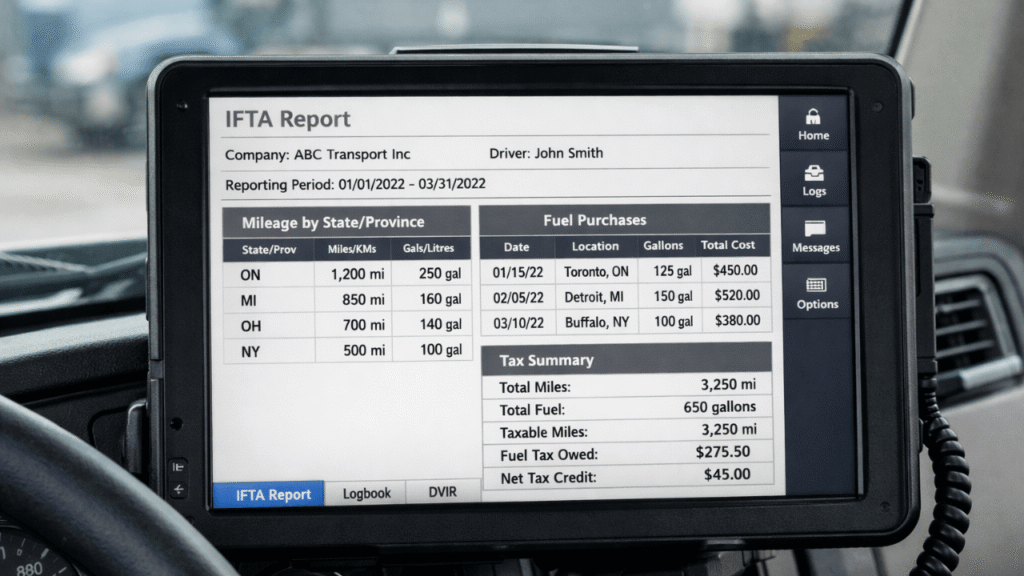
If you’ve ever scrambled at quarter-end to pull trip sheets, fuel receipts, and distance logs, you already know why ELD reporting for IFTA matters. The right ELD setup can turn a stressful, error-prone process into a routine where you’re a single truck or a growing fleet, workflow that supports cleaner filings and fewer surprises during audits.
Table of Contents
Why ELD Reporting for IFTA Makes Tax Season Easier
ELDs automatically record where and how fast a vehicle is moving, which makes it easier to file your taxes every three months. You can get consistent totals straight from your system, without relying on handwritten logs or papers scattered everywhere. This will help you create a reporting routine that you can use again and again.
Improved ELD reporting for IFTA usually helps with the following:
- Less math that has to be done by hand (less chance of “oops” math)
- More consistent totals across dispatch, payroll, and fuel records
- Better records if you are audited or reviewed
- More clear trip-level information to explain strange routes or detours
The ELD doesn’t do everything for you, though. But if you think of ELD reporting for IFTA as a process instead of a button you press every three months, you’ll usually find problems sooner, before they turn into corrected filings or painful reconciliations.
How to Use ELD Data for IFTA Mileage Reporting
To get the most out of your ELD, ensure it records clean distance data for every trip and unit. Your goal is simple: get the right totals for each jurisdiction and be able to explain the trip details.
This is what a useful workflow looks like:
1. Check that each truck’s profile is correct, including the VIN/vehicle ID, unit number, timezone, and odometer source if there is one.
2. Look over driver logs every week, not every three months. Find missing segments, unassigned driving, or log edits early.
3. Get mileage for a certain date range and compare it to dispatch records to find any obvious gaps.
4. Check the jurisdiction breakdowns to make sure the miles make sense for the route.
5. Always save reports (PDF and export file) and keep them by quarter.
This is when keeping track of your mileage becomes more than just a buzzword. You can avoid the chaos at the end of the quarter and make ELD reporting for IFTA feel like a normal part of your week if you check totals every week.
ELD Tax Reports for Fuel and Mileage Compliance
Distance is only half the story. You also need fuel records that match the how, when, and where of your runs. Good ELD tax reports for fuel and mileage compliance help you line up miles, fuel purchases, and fuel consumption patterns, so your filings look reasonable and defensible.
A few tips that actually save time:
- Standardize receipt handling: require drivers to submit fuel receipts on the same day (photo uploads work well).
- Match fuel purchases to routes: big fuel buys should align with where the truck was operating.
- Reconcile gallons and dates: look for duplicates, missing receipts, or purchases that don’t match a truck/unit.
- Document exceptions: idling, breakdowns, detours, and weather delays can impact patterns—note them.
This is the heart of fuel tax reporting. When your fuel and distance data match, ELD reporting for IFTA becomes much easier to trust, and much easier to explain.
Common Mistakes That Cause IFTA Headaches
Even with solid tools, a few common issues can create messy quarter-end numbers:
- Unassigned driving that never gets attributed to the right driver or unit
- Incorrect vehicle settings that skew distance or location details
- Late log edits that change totals after you’ve already pulled reports
- Missing state/province breakdowns, leading to inaccurate jurisdiction miles totals
For smoother tax compliance, set a simple internal deadline: finalize log reviews and fuel receipt checks a week before quarter close. That one habit alone can make ELD reporting for IFTA more predictable.
Best Practices to Make ELD IFTA Reporting Audit-Ready
Auditors don’t just want totals, they want support. The best defense is a clean trail of consistent reporting.
Aim to keep:
- Quarterly distance summaries and trip detail exports
- Fuel receipt records (with truck/unit and date clearly tied)
- Notes on exceptions (detours, deadhead, breakdowns, repairs)
- A simple written process that your team follows every quarter
When your records are consistent, IFTA reporting feels less like a fire drill and more like a normal admin task.
Staying Accurate and Confident With ELD Reporting for IFTA and Taxes
At the end of the day, ELD reporting for IFTA and taxes works best when you treat it like a monthly habit, not a quarterly emergency. Review logs regularly, reconcile fuel purchases, and keep your reports organized. Do that, and you’ll spend less time fixing problems and more time running your operation.
Need Help Simplifying ELD IFTA Reporting and Tax Records?
Reach out to us at www.welocity.ca, call 905-901-1601, or email info@welocity.ca if you need trucking-related services. Whether it’s ELD setup, compliance training, or audit-ready reporting support, we’ve got you covered.